Year-end closure
🎓 Principal
💰 Accountant
Closure is the end-of-year process that archives outgoing students, promotes admitted students to the next class, and freezes financial data. It takes place in two distinct steps.
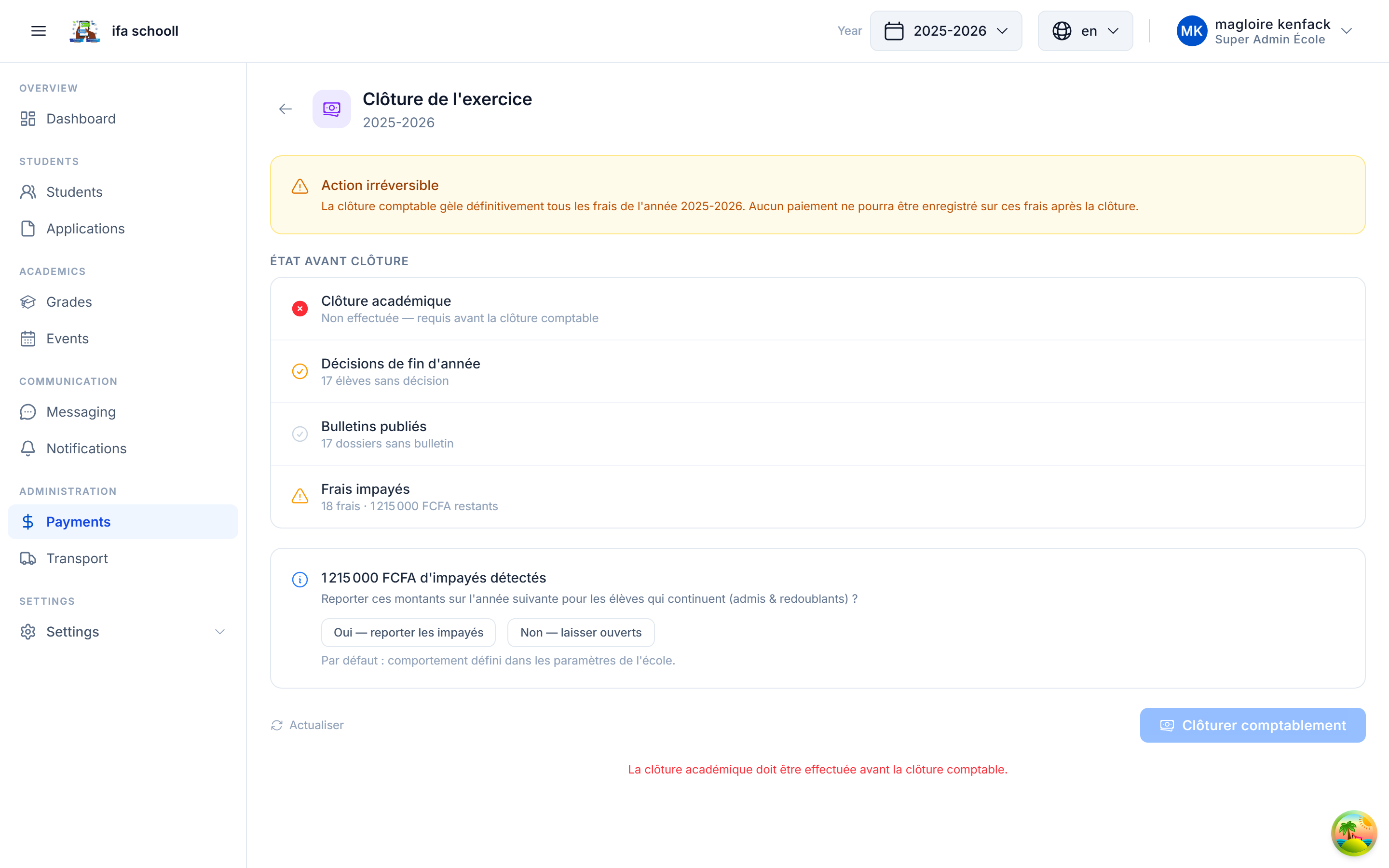
Prerequisites — Closure checklist
Before launching closure, HEMLE automatically checks that everything is in order.
The checklist shows the status of each condition:
| Condition | Description |
|---|---|
| ✅ Decisions complete | All students have a year-end decision |
| ✅ Report cards published | All report cards for the last term are published |
| ✅ Fees checked | Balances are handled (settled or carry-forward validated) |
Address all blockers before proceeding. Closure cannot be launched until the checklist is validated.
Step 1 — Academic closure
What to prepare
- The new academic year must have been created (dates of the next school year)
- All year-end decisions must have been entered
Launching closure
- Click "Close academic year"
- Select the destination new academic year
- Confirm
What happens automatically
| Student decision | Action |
|---|---|
PROMOTED — Promoted | Annual folder created in the next class of the new year |
REPEATING — Repeating | Annual folder created in the same class for the new year |
GRADUATED — Graduated | Student file archived — accessible in archives |
EXCLUDED — Excluded | Student file archived — accessible in archives |
TRANSFERRED — Transferred | Student file archived — accessible in archives |
The current year moves to PAST status. The new year becomes CURRENT.
Irreversible
Academic closure cannot be undone. Check all decisions before confirming.
Step 2 — Financial closure
This step is performed by the accountant / CFO, independently of academic closure.
What financial closure does
- Freezes the fee structures for the year — no further modifications possible
- Calculates the definitive financial summary for the year
- Generates the final financial report (viewable and exportable)
Carry forwardoption: if enabled, unpaid balances are carried forward to the new academic year's fee sheet
Launching financial closure
- Click "Close financially"
- Choose: Carry forward balances or not
- Confirm
After closure
- PROMOTED and REPEATING students are visible in the new year's list with their new class
- Archived students can be viewed from Students → Archives
- The final financial report is available in the past year's history
- The new year is active and ready for enrollments
→ View archives: Former students & Archives